The Migration Question Is Not Just “Can It Run?”
Hermes Agent now advertises an explicit migration path for OpenClaw users, which makes Hermes Agent OpenClaw migration a real planning topic rather than a curiosity. The important question is not whether a command can copy prompts or settings. The important question is whether your team keeps the controls that made autonomous coding safe: scoped secrets, isolated runners, review gates, logs, cost limits, and a rollback path.
This guide is written for teams already using OpenClaw-style agents and evaluating Hermes, the Nous Research agent with persistent memory, skills, messaging gateways, cron, subagents, MCP, and multiple terminal backends. Office Claws is separate from Hermes and OpenClaw; the honest fit is as an operator layer for Codex-backed desktop/VPS workflows when you want local control, cheap runners, and explicit human review.
What Hermes Changes Compared With an OpenClaw Workflow
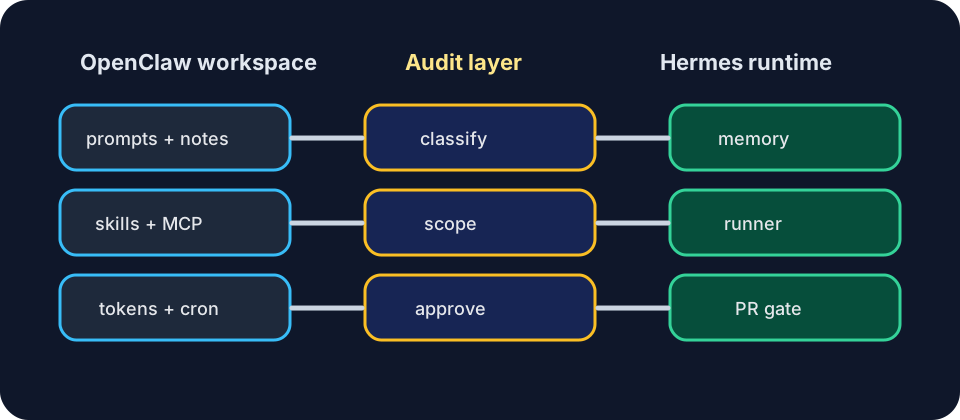
Hermes is not simply another coding CLI. Its official docs describe a self-improving agent that can create and improve skills, use persistent memory, talk through many messaging platforms, schedule cron tasks, spawn subagents, connect MCP tools, and run through local, Docker, SSH, Daytona, Singularity, Modal, or similar backends. Those are powerful differences.
For migration planning, treat them as new trust zones:
| Area | What to check before migrating |
|---|---|
| Install and onboarding | Who can install it, which model account is used, and whether desktop or CLI setup changes endpoint trust |
| Runtime location | Local shell, Docker, SSH, serverless, or VPS; confirm where code, logs, and secrets live |
| Memory model | What is stored across sessions, what can be recalled, and how private project facts are removed |
| Skills/plugins | Which skills are imported, created, or improved; who reviews them before reuse |
| Scheduling | Cron jobs can act later, so approvals and delivery surfaces need owner context |
| Messaging surfaces | Telegram, Discord, Slack, email, and other gateways widen the perimeter |
| Subagents | Parallel work needs per-branch isolation and merge discipline |
| Model/provider support | Provider flexibility is useful, but each account has its own cost and data policy |
| Migration path | Import convenience does not equal security equivalence |
The Safe Hermes Agent OpenClaw Migration Checklist
Use this as a one-hour planning gate before you migrate any production repository.
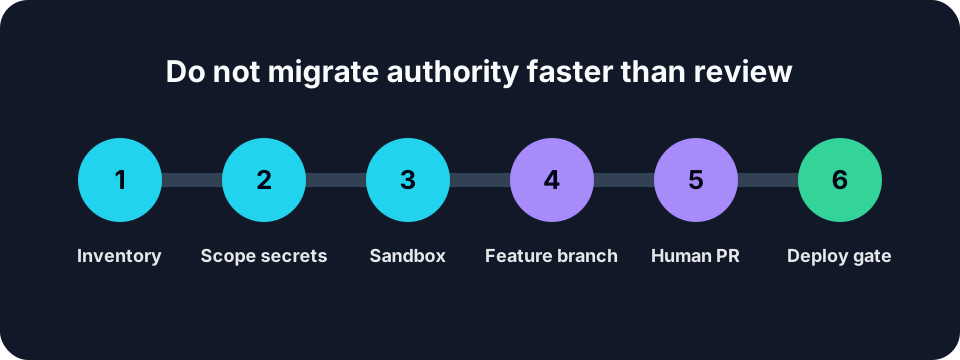
- Inventory the OpenClaw state. List prompts, skills, MCP servers, browser profiles, tokens, webhooks, cron jobs, and background tasks. If you cannot name it, do not migrate it automatically.
- Separate portable context from executable behavior. Project notes and coding preferences are safer to move than shell scripts, agent skills, browser automations, or deployment commands.
- Rotate or scope secrets. Assume any migration touches configuration files. Replace broad tokens with repo-scoped GitHub tokens, read-only API keys, or one-purpose deploy credentials.
- Choose the runtime boundary. A local shell is convenient; a VPS or container is cleaner for long-running work. Office Claws users should prefer one task per runner, one branch per task, and logs visible from the desktop.
- Rebuild review gates. Do not let the migrated agent push to main, deploy production, or edit billing settings without a human approval step.
- Test on a harmless repository. Run one issue, one branch, one PR, one rollback. Migration is not done until the failure path works.
- Document what changed. Future incidents are easier when the team can see which memories, skills, gateways, and schedules were enabled.
What Transfers Cleanly
The safest things to move are descriptive: repository conventions, test commands, style preferences, architecture notes, and runbook links. These make the new agent useful without expanding its authority.
The riskiest things to move are executable: shell aliases, deployment scripts, browser sessions, MCP servers with write access, messaging bot tokens, and old cron automations. Those should be recreated deliberately, not swept across by habit.
If you are using Office Claws for OpenClaw-adjacent coding operations, keep the control plane boring: clone the repo into a fresh runner, give the agent a single task, watch the log, require a PR, and destroy or reset the runner when the work is done. That pattern works whether the research topic is OpenClaw vs Codex, OpenClaw background tasks, or a Hermes migration experiment.
A Practical Target Architecture
A safe post-migration setup usually looks like this:
- Hermes experiments run in a sandbox, container, SSH runner, or disposable VPS.
- Source code changes land on feature branches only.
- Secrets are injected per runner, never copied from old OpenClaw workdirs wholesale.
- Messaging gateways are limited to the channels that actually need them.
- Cron jobs include owner, repo, branch, and “what to do on failure” context.
- Office Claws or another desktop manager tracks the runner, logs, cost, and final PR review.
This is less glamorous than “migrate everything in one command,” but it is the difference between a controlled agent platform and an unreviewed automation bundle.
When Hermes Is the Better Experiment
Hermes is especially interesting if your OpenClaw workflow depends on memory, long-lived assistant identity, autonomous skill creation, messaging from many surfaces, or scheduled work that should continue away from your laptop. Those are real strengths, and Nous Research is clearly aiming beyond a narrow coding CLI.
The tradeoff is operational complexity. A learning loop, persistent memories, wide messaging, and parallel subagents all create more places where a stale assumption or overbroad token can matter. That does not make Hermes unsafe; it means migration should be treated like adopting a new agent platform, not changing text editors.
Where Office Claws Fits
Office Claws does not claim to import Hermes or OpenClaw state. Its value is the practical operating model around coding agents: local desktop control, VPS runners, visible logs, branch discipline, and cost-predictable Codex-backed execution.
If your Hermes evaluation is mostly about autonomous coding, keep Office Claws in the loop as the runner manager and review surface. If your workload needs Hermes-specific memory, skills, messaging, and cron, use Hermes for that slice, but keep production code changes behind the same branch and PR gates you would use with OpenClaw security best practices.
Recommendation
Do not migrate an OpenClaw workspace to Hermes by copying everything first and auditing later. Move context first, executable authority second, and production permissions last.
The best Hermes Agent OpenClaw migration is boring on purpose: fresh runner, scoped secrets, one branch, one PR, logs preserved, and no production deploy until a human reviews the diff. That gives you room to evaluate Hermes on its merits without inheriting every old risk from the OpenClaw setup.
Sources and Related Reading
- Hermes Agent documentation — official Nous Research docs for installation, memory, skills, gateways, cron, subagents, MCP, and terminal backends: https://hermes-agent.nousresearch.com/docs/
- NousResearch/hermes-agent on GitHub — official repository and README feature summary: https://github.com/NousResearch/hermes-agent
- OpenClaw vs Codex
- OpenClaw Desktop Manager
- OpenClaw Background Tasks